Keeping my debugging skills sharp with Codex
Series: Reverse Engineering HarvesterThis review is part of the Reverse Engineering Harvester series, where I document my journey of reverse engineering the 1996 DOS game Harvester to re-implement its game engine in ScummVM.
- ← Reverse Engineering Harvester with Ghidra and Codex - Part 7: Demo Support
- Keeping my debugging skills sharp with Codex
Article 8 of 8 in this series.
My career as a programmer began in 2001, when I joined EDS as a co-op student. I was close to finishing a college program in Systems Analysis and Design and already had a decade of experience programming in C, BASIC, and Pascal. I could call myself a software engineer. Competent felt like a stretch. I wanted to understand how the more experienced engineers around me thought through problems and came up with solutions.
So I got to know those engineers, found time to talk with them, and asked questions. Their answers almost always raised more questions. I’d take in what I could and keep digging. Over the years, I became a senior software engineer, then an engineering lead, and eventually a systems architect.
For about 12 years, I kept going through the same loop. Hit a problem I couldn’t solve → look for a solution → find one I didn’t understand → break it into pieces → research the parts I didn’t get → put it back together and get it working → repeat.
Before LLMs, I hunted for solutions in books, through search engines, and on forums. Stack Overflow reigned supreme. My Ctrl, C, and V keys definitely got a good workout (I didn’t buy it, but I would have benefitted from their custom keyboard). Once I got the code working, I’d start digging again to figure out why it worked.

With tools like Claude and Codex, I can hand off much of that loop and get working code faster. But the learning was never just in getting the code to work. It was in digging into why it worked. If I skip that part, I may have the output, but still lack the understanding to explain or defend the solution.
I put that into practice when I used Codex to help build ScummVM’s Harvester engine, which is now open for public testing. I took the project as a chance to get better at C and C++ and learn my way around Ghidra. I could work through what the original game was doing and see whether I understood it well enough to reproduce it.
Outcomes over output
Wikipedia describes engineering as using science and mathematics to design and improve systems, devices, and processes that solve problems within constraints. Software engineering is that same work applied to computer systems.
On Harvester, my first goal was to reproduce the original game’s behaviour in ScummVM. I also wanted to differentiate which behaviours came from the original game and which came from decisions I’d made in the new engine. That gave me somewhere to start the next time something looked wrong. I could check what the original actually did before deciding what to change in ScummVM.
Coding agents can generate code faster than I can make sense of it. In his guide to AI slop, George Miscalencu writes, “The AI generates liability for free.” If I merge a change I barely understand, someone on the team still has to figure it out the next time we need to debug it or change how it works.
There’s a learning cost, too. In an Anthropic study, developers who had AI help with a task in an unfamiliar Python library averaged 50% on a follow-up quiz. Those who did the task without AI averaged 67%. That study looked at how developers picked up a new skill. I worry about what happens to the skills I already have when I stop practicing them.
Start with a question
In one scene in Harvester, Steve, the player character, could walk out of bounds through a bathroom wall. This behaviour was reproducible in the original game as well as my implementation, but I didn’t know why.
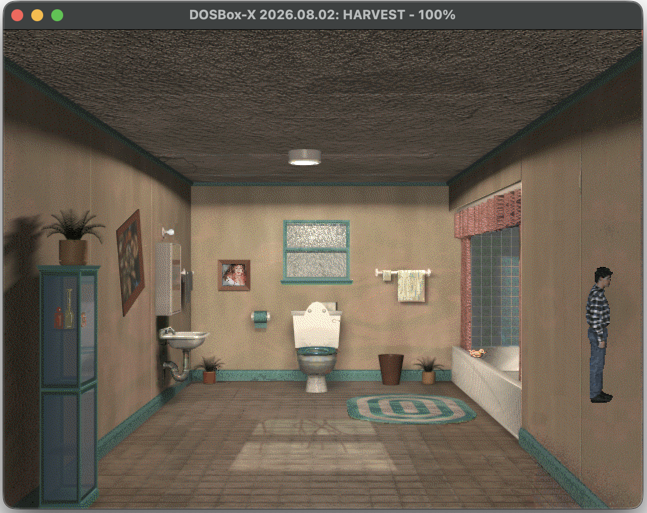
I add a lot of logging when I build with coding agents. The trace gave us both the same place to start, as we could see where ScummVM put the wall, where it drew Steve, and whether it let him move.
Here are three lines from the trace, shortened to the fields that mattered.
1
2
3
Harvester: scene entity spawned … object='__ANON_OBJECT_16' … pos=(449,0,z=-8.00) rect=(449,0)-(640,480) …
Harvester: player frame bounds frame=51 … rect=(586,234)-(633,369) z=5.00
Harvester: player keyboard move … step=(1,0) pos=(609,369,z=5.00) … frame=51 moved=1
The first line shows the right wall’s rectangle. The second shows Steve’s sprite bounds inside it. The third records that he moved anyway. That gave me a question to take to the original executable. What could make the game skip a wall that Steve already overlaps on screen?
I asked the agent to follow that path in Ghidra. I really don’t understand assembly, so I needed help getting from the listing to the decision it was making. Here’s the part we found in the original collision routine.
0004cc71: TEST AL,AL
0004cc73: JZ 0x0004cccb
0004cc75: MOV EDX,ESI
0004cc77: MOV EAX,EDI
0004cc79: CALL 0x0004b700
The instructions just above this excerpt compare the objects’ depth ranges and leave the result in AL. If those ranges don’t overlap, the jump skips to the next object. The call at the bottom checks the screen bounds. I can follow that decision in C-like pseudocode.
1
2
3
4
5
if (aMaxZ < bMinZ || bMaxZ < aMinZ)
    continue;

if (!screenBoundsOverlap(a, b))
    continue;
Once I knew what the collision code was checking, I went back to the wall from the trace. It started at x=449 and z=-8. Both numbers turned up in the second OBJECT row in the original HARVEST.SCR. Here are the relevant rows, with the trailing fields omitted.
1
2
3
 -5   4  366  479   0  90  ROOM   "ST_BATHRM" …
  0   0  195  479  -8  10  OBJECT "ST_BATHRM" "" …
449   0  639  479  -8  10  OBJECT "ST_BATHRM" "" …
The columns mean different things depending on the record type. In ScummVM’s parser, the first two numbers on the ROOM row become minZ and maxZ. That gives Steve a live depth range of -5 to 4. On an OBJECT row, the first four numbers describe the rectangle. The fifth is initialZ, where the object starts in depth, and the sixth is zExtent, how far it extends from there.
Now I could put actual numbers into the check I’d been looking at in Ghidra. Both walls end at -8 + 10 = 2, and the room lets Steve reach 4. At depths 3 and 4, the engine skips the wall before it checks the screen overlap I saw in the log.
Own the design
Once I understood the check, a solution could be implemented as a patch that runs when ScummVM reads the room objects. It looks for an unnamed object in the bathroom with the original wall dimensions and depth. This excerpt shows the last check, which picks out the two walls by their horizontal bounds.
1
2
3
4
if ((object.initialX == 0 && object.boundsX2 == 195) ||
    (object.initialX == 449 && object.boundsX2 == 639)) {
    object.zExtent = 12;
}
That assignment extends both walls to depth 4, the room’s upper limit. The existing collision check can handle them from there.
Use the agent to learn
There was still something in the trace I couldn’t explain. Why did it say z=5.00 if Steve could only reach depth 4? The movement log showed his placement depth. The engine applied an offset to get the live depth of 4 that collision used. Once I could follow both values through the code, I knew which one to use when checking the wall.
That’s where logging helps me learn. I can bring the agent a specific value and ask it to show me where the value was set and where it’s used. Then I can follow the code and decide what I’d want to see in the next trace. In this case, I’d log Steve’s placement depth and live depth side by side, along with where the wall ends and whether it passes the depth check.
I went back to the comparison just above the branch we’d looked at in Ghidra. The instruction that mattered was JGE, short for “jump if greater than or equal.”
0004cc58: CMP EBP,dword ptr [ESP]
0004cc5b: JGE 0x0004cc61
At this point, the code compares the end of one object’s depth range with the start of the other’s. When the wall ends at 2 and Steve starts at 4, the check fails. With the patch, both values are 4, and equality is enough to keep checking for a collision.
We ran ScummVM’s collision function in a small test harness. At live depth 4, a test player’s rectangle registered an overlap with each patched wall. At the same depth, a rectangle between the walls passed through clear. The session recorded the result:
1
PASS: 807 checks across 763 GOG object records, both wall depth ranges, spatial rejection, repeat application and 16 near-match exclusions; exactly two records patched.
I started with a log that said Steve moved through a wall. By the end, I could explain which comparison let him through and predict what would happen if I changed one number.
In conclusion
Throughout my engineering career I would usually came away from a technical conversation with a colleague with another question I wanted to answer. I still want that from a session with a coding agent. Tracing a surprising value from the log into the code is the kind of debugging I want to stay good at. Every time I stop as soon as the agent hands me a patch, I give up a chance to slow down, ask questions and learn.